AI Product Video Generator
Upload one product photo, pick a shot style, and get a 5-second showcase clip — no camera, no studio, no editing timeline. The fastest way from a product image to a video for listings and ads.
Turn a Product Photo into a Video Ad in Minutes
Wandura AI Product Video animates a single product photo into a short, scroll-stopping clip using one of five preset shots: a smooth 360° orbit, a cinematic hero zoom-in, a handheld lifestyle b-roll, a floating showcase, or an unboxing tease. Every preset is written to keep the product sharp, centered and undistorted — the usual failure mode of free-prompt video generation. Pick the shot, optionally add a line of detail like "on a marble table, soft studio light", and Create. Kling 2.5 Turbo renders fast drafts; Kling V3 Pro delivers the cinematic version — the credit price of each is shown before you create.
Try AI Product Video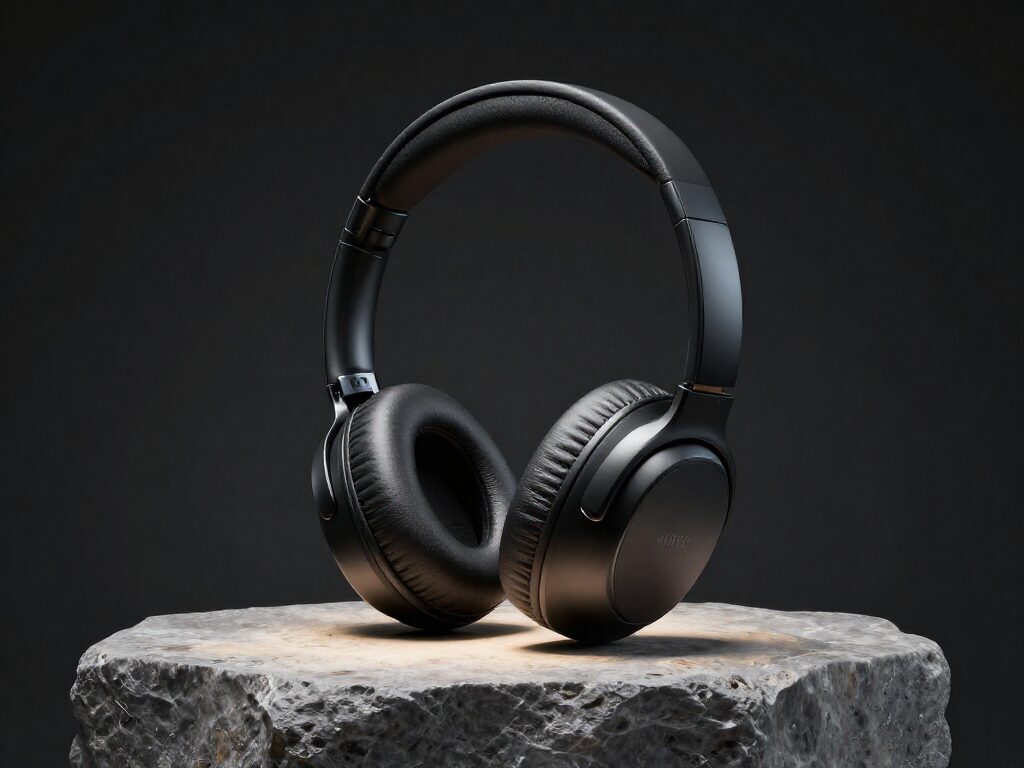
2 AI Models, One AI Product Video Tool
Start from One Clean Product Photo
The whole workflow begins with a single still. The image shown here is an example of the INPUT — an AI-generated product photo of the kind you would upload; the before/after at the top of this page shows the real 360° Orbit clip Wandura generated from this exact photo. A clear, well-lit shot with the product fully visible is all the tool needs; cutouts and studio-style photos animate most cleanly.
Try AI Product VideoEcommerce Listings That Convert
Static photos on Amazon, Shopee and Shopify blend into the page. A clean 360° orbit or hero zoom clip next to your listing shows shoppers the product from angles a photo can't — without booking a studio or a videographer. The clip here is the real 360° Orbit output from the input photo above.
Try AI Product VideoAds for TikTok and Reels
Use the lifestyle b-roll or unboxing tease shot to make the product feel real in a scene, then push the clip into your ad account. The output framing follows your uploaded photo, so start from an image cropped the way you want the ad to look.
Try AI Product VideoFive Shots, Zero Prompt Engineering
360° Orbit for all-around views, Hero Zoom-In for drama, Lifestyle B-Roll for in-context realism, Floating Showcase for a premium commercial look, Unboxing Tease for anticipation. Each is a tuned prompt template — you never write motion directions yourself.
Try AI Product VideoDraft Cheap, Finish Cinematic, Add Sound
Test shots on Kling 2.5 Turbo drafts first, then rerun the winner on Kling V3 Pro for the hero version. Chain the finished clip into Auto Sound for a matching foley or music track without re-uploading.
Try AI Product VideoHow It Works
Step 1: Upload your product photo
A clear, well-lit shot with the product fully visible and in focus — a clean or plain background gives the sharpest result.
Step 2: Pick a shot style
Choose 360° Orbit, Hero Zoom-In, Lifestyle B-Roll, Floating Showcase or Unboxing Tease, and optionally add extra details like the setting or lighting.
Step 3: Create
Pick a model and hit Create — the 5-second clip renders in the cloud and is saved to your Creations for download or chaining onward.
How Much Does AI Product Video Cost?
Every model below runs on one Wandura credit balance — pay only for what you generate, with no separate subscription per model.
| Model | Pricing |
|---|---|
 Kling 2.5 Turbo Kling 2.5 Turbo | Draft · fast |
| Kling V3 Pro | Cinematic |
FAQs
It turns a single product photo into a short showcase clip using a preset shot style — 360° orbit, hero zoom-in, lifestyle b-roll, floating showcase or unboxing tease — so you never write a motion prompt or film anything yourself.
No. Pick a shot style and, optionally, add a short line of extra detail like "on a marble table, soft studio light". Wandura builds the full motion prompt behind the scenes, tuned to keep the product sharp and centered.
Each run produces one 5-second clip rendered at 720p — a length made for listings, feed ads and loops rather than long-form video.
Pricing is in credits per clip: Kling 2.5 Turbo (default) is the budget option, Kling V3 Pro costs more for a more cinematic result. Both prices are shown next to the model before you create.
A clear, well-lit photo with the product fully visible, in focus, and ideally on a clean background. The presets are written to keep the product undistorted, but they can only preserve detail that exists in the source image.
The framing follows your uploaded photo — so crop the source image the way you want the clip to look before uploading, for example a vertical crop for TikTok and Reels placements.
Yes — run the photo through Product Placement to composite it into a styled scene first, then feed that result into AI Product Video for the motion. Chaining between tools needs no re-upload.
Chain the finished clip into Auto Sound to generate matching foley, ambience or music. Results live in your Creations, so the handoff is one click.
Image to Video is the free-form engine: you write the motion prompt and control every setting. AI Product Video is a preset on top of it — five commerce-tuned shots with the settings fixed for product work, so a good clip is two clicks instead of prompt iteration.
Yes — you get full commercial rights on all paid plans.