Price Before You Create
preview_generation and preview_render price a job for free. The CLI prints the price before every submit, and --cost-only stops after the price.
MCP server · CLI · Claude & ChatGPT connector
Wandura MCP connects Claude, ChatGPT, Cursor and other AI agents to Wandura, so they can find ad templates and create video, images and audio for you. Every job that spends credits gets a free price check first, at 1 credit = $0.01 like the website.
Connector URL for Claude and ChatGPT. Using Claude Code, Cursor or a terminal? See setup
Pick the app you use. One click, then sign in.
 Chrome extensionRemake ads from any pageAdd to Chrome
Pick your app above. We do the first step for you and show what is left right here.
Connector URL copied. Claude is open in a new tab.
Added once, it also works in the Claude desktop app. No new tab? Open Claude connectors. URL: https://www.wandura.ai/api/mcp
Connector URL copied. ChatGPT is open in a new tab.
Not every ChatGPT plan can add custom connectors. URL: https://www.wandura.ai/api/mcp
Cursor is opening.
Nothing opened? Install Cursor first, then click again. Using VS Code? Install in VS Code.
Chrome Web Store is open in a new tab.
Works on ad libraries, social feeds and product pages. No new tab? Open the Chrome Web Store.
Setup prompt copied.
Set up Wandura for me so I can generate ad videos from here.

1. Install the CLI and sign in: run `npm i -g @wandura/cli`, then `wandura auth login` and complete the sign-in in the browser it opens.
2. Add the Wandura MCP server to yourself. It reuses the sign-in from step 1, so there is no API key to create. Use the line for the agent you are:
   - Claude Code: run `claude mcp add wandura -- npx -y @wandura/mcp`
   - Codex: run `codex mcp add wandura -- npx -y @wandura/mcp`
   - Gemini CLI: run `gemini mcp add wandura npx -y @wandura/mcp`
   - Cursor: add `"wandura": { "command": "npx", "args": ["-y", "@wandura/mcp"] }` under "mcpServers" in ~/.cursor/mcp.json
   - Windsurf: add the same entry under "mcpServers" in ~/.codeium/windsurf/mcp_config.json
   - Any other agent: register an MCP server named wandura that runs `npx -y @wandura/mcp`
3. Install the companion skill: run `wandura skills install`.

If you cannot run commands (for example you are the Claude or ChatGPT app), do not try: tell me to open https://www.wandura.ai/mcp#setup and use the button for my app.

Once that's done, tell me if I need to restart you to see the Wandura tools, and let me know when it's ready.For claude.ai and Claude Desktop
You will paste this URL into Claude in the next step.
https://www.wandura.ai/api/mcpIn Claude, open Customize, then Connectors.
Add a custom connector named Wandura, paste the URL and sign in. Jobs are billed to your Wandura credits.
For ChatGPT
You will paste this URL into ChatGPT in the next step.
https://www.wandura.ai/api/mcpIn ChatGPT, open the connector settings and add a custom connector named Wandura with this URL.
Sign in when ChatGPT asks. Jobs are billed to your Wandura credits, and you can revoke access any time.
For Claude Code, Codex, Cursor, Windsurf or any MCP client
Set up Wandura for me so I can generate ad videos from here.

1. Install the CLI and sign in: run `npm i -g @wandura/cli`, then `wandura auth login` and complete the sign-in in the browser it opens.
2. Add the Wandura MCP server to yourself. It reuses the sign-in from step 1, so there is no API key to create. Use the line for the agent you are:
   - Claude Code: run `claude mcp add wandura -- npx -y @wandura/mcp`
   - Codex: run `codex mcp add wandura -- npx -y @wandura/mcp`
   - Gemini CLI: run `gemini mcp add wandura npx -y @wandura/mcp`
   - Cursor: add `"wandura": { "command": "npx", "args": ["-y", "@wandura/mcp"] }` under "mcpServers" in ~/.cursor/mcp.json
   - Windsurf: add the same entry under "mcpServers" in ~/.codeium/windsurf/mcp_config.json
   - Any other agent: register an MCP server named wandura that runs `npx -y @wandura/mcp`
3. Install the companion skill: run `wandura skills install`.

If you cannot run commands (for example you are the Claude or ChatGPT app), do not try: tell me to open https://www.wandura.ai/mcp#setup and use the button for my app.

Once that's done, tell me if I need to restart you to see the Wandura tools, and let me know when it's ready.For Claude Code, Codex or any agent with a terminal · Node 20 or newer
The CLI has no dependencies.
npm i -g @wandura/cliComplete the sign-in in the browser it opens.
wandura auth loginNo API key needed for Claude or the CLI. Running in CI or on a machine without a browser? Manage API keys
Overview
Wandura MCP is a Model Context Protocol server that lets your AI agent use Wandura directly. From Claude, ChatGPT, Claude Code, Cursor, Windsurf or another MCP client, the agent can search ad templates, run a free price check, clone a template with your product or render video, images and audio, then return the result.
The Wandura CLI offers the same workflow in a terminal and prints the price before every submit. Both use your Wandura account, so jobs draw from your existing credits.
https://www.wandura.ai/api/mcp@wandura/mcp@wandura/cli · Node 20+One connection to search ad templates, price a job and create video, images and audio, without leaving your agent.
Ask for a template, check the price, then swap in your product. A clone keeps the template’s aspect ratio, length and format, and the server writes the prompt for you.
Connect WanduraFind a cold brew ad template and tell me what it costs
search_templatesMatching templates, 9:16, 10 s
preview_generationPrice shown, 0 credits spent
Make it with my can
clone_templateJob queued
Your 9:16 ad is ready to download
Send your own prompt to the model you pick. A render passes your prompt to the model unchanged, and your agent can upload a local file for the render to use.
Connect WanduraMake a 5 second video of serum.png on marble
list_modelsVideo models and the settings each accepts
upload_assetserum.png uploaded
Video ready, with your prompt sent unchanged
Price every clone first, approve the total, then queue the jobs. Each job finishes even if your agent stops checking.
Connect WanduraSame template, my three products
preview_generation ×3Total shown, 0 credits spent
Go
clone_template ×33 jobs queued
All three finish even if nothing is watching
The Wandura CLI lists templates and prints the price before every submit. Add --cost-only to see the price without spending anything.
Connect Wandurawandura templates list --q "skincare"Matching templates with aspect and length
wandura generate ugc-beverage-junday-sparkling-mango --cost-onlyPrints the price and stops. Nothing is spent
Example requests and the Wandura tools an agent uses to answer them. Copy a prompt and try it after you connect.
Find a skincare ad template in 9:16 and tell me what it costs.Your agent searches the catalog, reads the template’s format and runs a free price check before anything is created.
Make that template with my product photo.The agent uploads your file and clones the template. Cloning spends credits, so it runs after the price is shown.
Generate a clean studio background for my bottle, then a short voice line for the ad.Renders send your prompt to the image or audio model you choose. Ask for the price first with a preview.
Is my ad ready? Send me the download link.You get a job id right away. The agent checks the status and returns the result URL when the job finishes.
Find a skincare ad template in 9:16 and tell me what it costs.
search_templatesget_templatepreview_generationMake that template with my product photo.
upload_assetclone_templateSpends creditsGenerate a clean studio background for my bottle, then a short voice line for the ad.
list_modelspreview_renderrender_imageSpends creditsrender_audioSpends creditsIs my ad ready? Send me the download link.
get_generationPrompts to paste into your coding agent, one for each kind of app people build on Wandura. Sign in once with wandura auth login, then add the server.
claude mcp add wandura -- npx -y @wandura/mcp{
"mcpServers": {
"wandura": { "command": "npx", "args": ["-y", "@wandura/mcp"] }
}
}Price a template for each product in a list before anything is made.
For each product in products.json, find a 9:16 ad template that fits it and price a clone. Show me a table of templates and costs, and create nothing until I approve.search_templatesget_templatepreview_generationclone_templateSpends creditsRender the same product with different openings and compare them.
Write three different opening lines for my app ad, price a short 9:16 video for each, then render only the ones I pick.list_modelspreview_renderrender_videoSpends creditsget_generationTurn a screenplay into a project with characters, places and scenes.
Create a Story mode project from script.md, wait for the breakdown, then price the storyboards and send me the approve link.story_create_projectstory_get_projectstory_quotestory_get_quotestory_runSpends creditsPick a take for every scene and get one video back.
Check episode 1 of my Story mode project. Use the first finished take for any scene without one, then export the episode and send me the download link.story_get_episodestory_choose_takestory_export_episodestory_get_exportMake a background and a music bed for a title screen.
Make a 16:9 forest background for my game title screen and a calm music bed to go with it. Price both first.list_modelspreview_renderrender_imageSpends creditsrender_audioSpends creditsget_generationTurn one photo into a short clip with a ready-made effect.
List the photo effects, price a 5 second clip of photo.jpg with the one I choose, then render it.list_effectsupload_assetrender_effectSpends creditsget_generationBuilding an app that calls Wandura from your own server instead of from an agent? The image and video API runs ready-made styles with one HTTPS call, and a test key returns a sample result so you can build before you add money. Read the API docs · OpenAPI file
Story mode turns a screenplay into episodes, scene by scene. Your agent does the work, and you approve every price in Wandura.
Your agent sends a screenplay or story text. Wandura breaks it into characters, places, props, episodes and scenes.
story_create_projectstory_get_projectRead the episode outline, fix a line or edit how a character looks before any picture is drawn.
story_get_scriptstory_update_scriptstory_list_assetsstory_update_assetFor pictures, storyboards or scene videos, your agent asks for a quote. A quote costs nothing and runs nothing.
story_quoteYou open the approve link and accept the price in Wandura. Your agent cannot approve a paid step for you.
story_get_quoteOnce approved, the agent runs the step, picks a take for each scene and exports the episode as one video.
story_runSpends creditsstory_choose_takestory_export_episodestory_get_exportNothing that costs credits runs until you press Approve in Wandura. If the price goes up after you approve, the step does not run.
Examples from the catalog. Your agent searches the current list, and each template keeps its aspect ratio, length and format.
 Lightning Bolt Cargo Try-On — off-the-shoulder graphic haul9:16 · 13 s
 Rose Gold Baguette — Campaign Glow9:16 · 10 s
 Starberry Gummy Duo Review9:16 · 15 s
 Sneaker Cleaner Spray — Before / After9:16 · 10 s
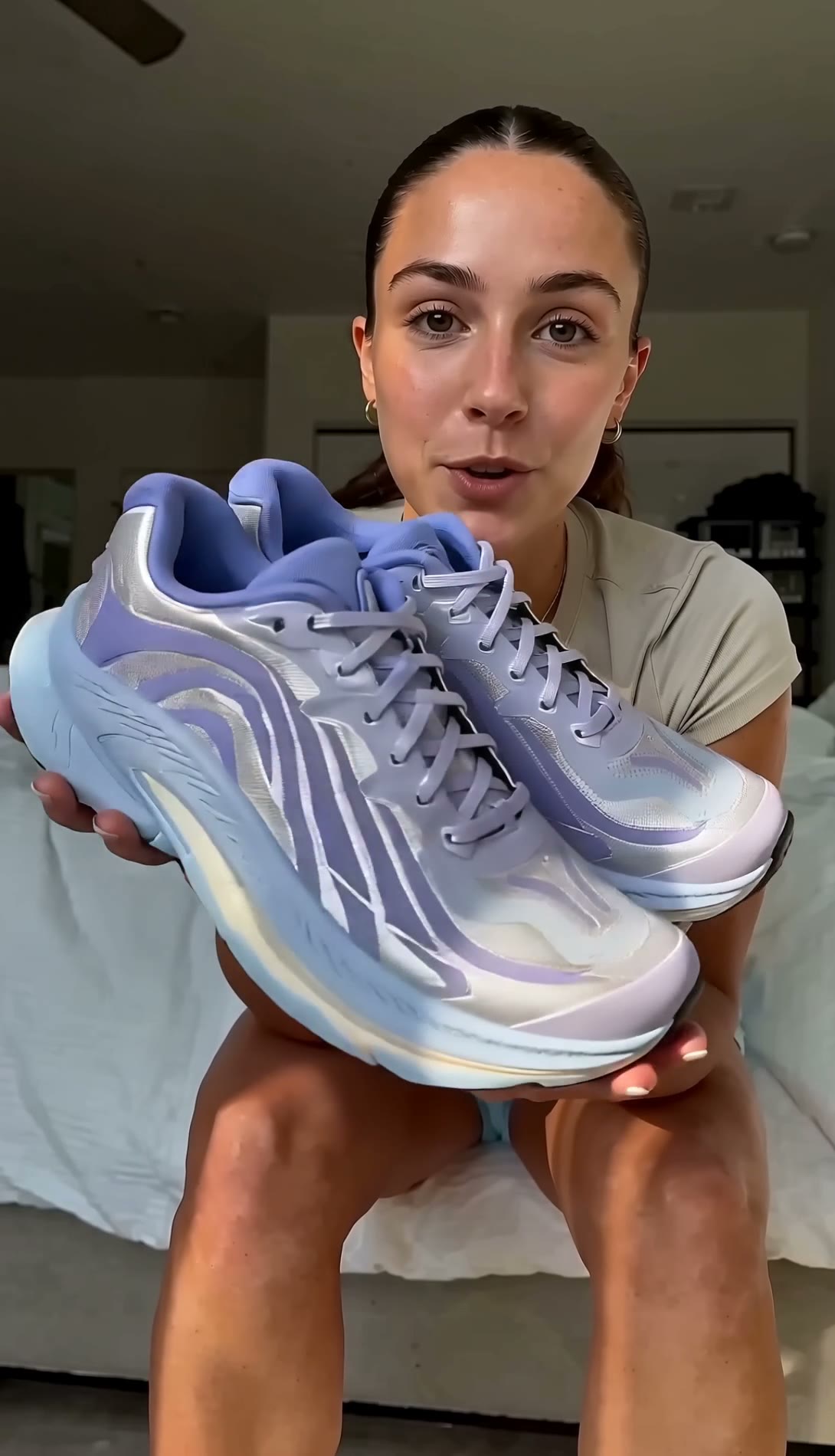 UGC running-shoe review — lilac trainers laced on and walked in9:16 · 15 s
 Automatic Gravity Pet Feeder9:16 · 10 s
 Tote that opens into an umbrella — rain-start reveal9:16 · 12 s
 Sidewalk lip-oil reveal — giant display cameo9:16 · 12 s
The server sends your agent the current tool list. Every tool that spends credits has a free price check first.
search_templatesSearch ad templates by product, format and industryget_templateRead one template: aspect, length and formatlist_modelsList models with the settings each one acceptslist_effectsList the 20 one-photo video effects (e.grender_effectRender a one-photo video effect from list_effects, SPENDS CREDITSSpends creditsbrowse_libraryFind creators, hooks, scenes and your saved productspreview_generationPrice a template clone before creating itpreview_renderPrice a video, image or audio renderclone_templateClone a template with your productSpends creditsrender_videoRender a video from your prompt with any modelSpends creditsrender_imageGenerate a product shot, background or characterSpends creditsrender_audioGenerate a voice line, sound effect or music bedSpends creditsupload_assetUpload a local file so a render can use itget_generationCheck status and get the result URLstory_list_projectsList the user's Wandura Story mode projects (films made from a script), newest first, with a link to open each onestory_create_projectCreate a Wandura Story mode project from a screenplay or story text and start the script breakdown (characters, places, props, episodes, scenes)story_get_projectStart here for an existing projectstory_get_scriptRead the analysed script of a Story mode project: title, logline, synopsis, genre and tone, and the episode outlinestory_update_scriptReplace a Story mode project's script and analyse it again (a few minutes)story_list_assetsList a Story mode project's assets (characters, backgrounds, props) with their descriptions and whether each has a picture yetstory_update_assetEdit an asset's name, description or identity phrasestory_get_episodeRead one episode of a Story mode project: every scene (one scene = one video clip) with its cast, reference assets, storyboard state (and whether it is outdated), video takes with status, and the chosen takestory_set_scene_assetsChoose which assets (reference pictures) a scene's storyboard and video are made fromstory_refresh_sceneBring one scene up to date with the latest script after story_update_scriptstory_choose_takeChoose which finished video take of a scene goes into the episode (same as 'Use in episode' in Wandura)story_quotePrice a paid step and ask the user to approve it in Wandurastory_get_quoteCheck whether the user approved, declined or let a quote expire, and after a run, which jobs it startedstory_runRun a quote the user has approved in WanduraSpends creditsstory_get_jobStatus of one Story mode job (asset picture, storyboard or scene video): queued, running, done (with url) or errorstory_add_episodeAdd an episode to the end of a Story mode projectstory_create_assetAdd a character, background or prop to a Story mode project, for ones the script breakdown did not findstory_set_asset_imageSet an asset's reference picture from an image the user gave youstory_export_episodeAssemble an episode into one video: the chosen take of every scene, in order, with the episode's musicstory_get_exportStatus of the latest assembled video of an episode: none, assembling, done (with a download url) or errorpreview_generation and preview_render price a job for free. The CLI prints the price before every submit, and --cost-only stops after the price.
Only the tools that create something spend credits. Your balance and account limits cap what any agent can use, with the same credits and prices as the website.
Wandura sees your account identity so jobs are billed to your credits: openid, email and offline_access. Revoke access any time in your client’s connector settings.
Quick answers about setup, credits and access.
Contact supportThe Wandura MCP server connects AI agents such as Claude, ChatGPT, Claude Code, Cursor and Windsurf to Wandura through the Model Context Protocol. Your agent can search ad templates, price a job for free, clone a template with your product or render video, images and audio with the model you pick, then track the result.
On this page, press Open Claude in the Claude app tab: it copies the connector URL and opens Customize, then Connectors in Claude. Click Add, choose Add custom connector, name it Wandura, paste https://www.wandura.ai/api/mcp and sign in. On a Team or Enterprise plan, an owner adds it first in Organization settings.
On this page, press Open ChatGPT in the ChatGPT tab: it copies the connector URL and opens ChatGPT settings. Turn on Developer mode if asked, add a custom connector named Wandura with https://www.wandura.ai/api/mcp, then sign in to Wandura. Not every ChatGPT plan can add custom connectors. Jobs are billed to your Wandura credits.
In Cursor or VS Code, press Add to Cursor or Add to VS Code on this page and sign in. For any agent, copy the setup prompt and paste it into the agent. It installs the CLI with npm i -g @wandura/cli, signs you in with wandura auth login, adds the @wandura/mcp server with the right command for Claude Code, Codex, Gemini CLI, Cursor or Windsurf, and installs the companion skill with wandura skills install.
Yes, with Story mode. Your agent creates a project from a screenplay, reviews the characters and scenes, and asks for a price on each paid step. You approve that price in Wandura before anything is generated, then the agent runs the step and exports the episode as one video.
No. Claude signs you in through the connector, and the CLI signs in through your browser. Keys are for CI and machines without a browser.
Your account identity, so jobs are billed to your credits. Scopes are openid, email and offline_access. You can revoke access any time in your client’s connector settings.
Claude, ChatGPT, Claude Code, Cursor, Windsurf and any client that connects to an MCP server. The CLI needs Node 20 or newer and has no dependencies.
Same credits and prices as the website. preview_generation and preview_render price a job for free, and the CLI prints the price before every submit.
A clone keeps the template’s aspect ratio, length and format while you swap in your product, and the server writes the prompt. A render sends your own prompt, unchanged, to the model you pick.
A few minutes. You get a job id right away, and the job finishes even if your agent stops checking.
Only 6 tools spend credits, and each has a free price check first. Your balance and account limits cap what any agent can use, and you can revoke access at any time.
Connect once, then ask your agent to find a template, check the price and create.
 Codex