Generate AI Videos Without Watermarks
Create professional AI-generated videos for social media, ads, presentations, and more—completely free of watermarks or logo overlays.
Why Watermark-Free Video Generation Matters for Creators
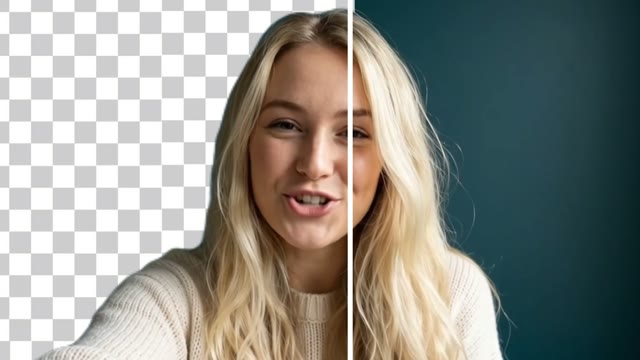
Most AI video tools add visible watermarks to every generated clip—your video starts with their logo and ends with their branding. This undermines your professional image and limits where you can publish. Wandura's AI video generator produces clean, watermark-free output you can use directly across your channels. Whether you're building content for clients, growing a personal brand, or producing marketing assets, the videos you create are yours to use without editing out unwanted logos or overlays.
Try Wandura AI28 AI Video Models, One Text → Video Tool
 Kling 3.0Cinematic
 Seedance 2.0Multimodal · up to 4KSeedance 2.5Cinematic · up to 30s · 720p maxSeedance 2.0 FastFast · 720pSeedance 2.0 MiniCheapest · 720p max
 Veo 3.1Premium · audio
 LTX 2.3 FastDraft
 Pika 2.21080p · commercial
 Hailuo 02 StandardCost-efficient
 Happy Horse V1.13–15sKling 2.6Native audioVeo 3.1 FastQuicker · audioVeo 3.1 LiteBudget · audioHailuo 2.3 StandardRealistic motion
 PixVerse V6Stylised · 1080p
 Vidu Q3Audio · 1080p
 Wandura 1.3Audio syncWandura 1.4Multi-shot · up to 15sMiniMax H3Up to 2KMiniMax H3 MaxPremium · 1080pMiniMax H3 Max TurboFast · cheapKling O3Multi-shotGemini Omni Flash 1.1Fast · up to 4K
 FLUX.3 VideoAudio · up to 20sKling O1Omni · up to 10sWandura 1.5Up to 15sLTX 2.5 ProAudio · 1080p
 Luma Ray 3.2Cinematic · 5s or 10s

Client-Facing Video Content
When producing videos for clients, branded overlays from AI tools look unprofessional and signal that you relied on a free or cheap service. Wandura's watermark-free output lets you deliver clean videos that reflect your actual production quality and expertise. Your clients see your work, not someone else's watermark.
Try Wandura AI
Social Media Content Creation
Platform-native content performs best on Instagram Reels, TikTok, and YouTube Shorts. AI-generated intros or transitions with watermarks disrupt the viewer experience and can trigger reduced reach on some platforms. Use Wandura to generate seamless video segments that integrate naturally into your content without third-party branding.
Try Wandura AI
Marketing and Advertising Assets
Promotional videos for paid campaigns, email marketing, or website embeds need to look polished. A visible watermark on an ad or landing page video undermines trust and dilutes your brand identity. Generate your video content with Wandura and export files ready to publish directly to your ad accounts, email platform, or website without post-processing.
Try Wandura AI
Internal Training and Presentations
Internal training videos, recorded presentations, and internal announcements often get shared across your organization via Slack, email, or your intranet. AI-generated segments within these videos shouldn't carry external branding that confuses employees or external viewers. Create functional, professional internal content with no watermark artifacts.
Try Wandura AI
E-commerce and Product Showcase Videos
Product demonstration and lifestyle shots for e-commerce need a clean final look. Watermarks on product videos create friction at the point of purchase and reduce conversion rates. Generate your AI-assisted product showcase videos through Wandura and embed them directly on product pages, Amazon listings, or Shopify stores without worrying about unwanted logo overlays.
Try Wandura AIHow It Works
- Step 01
Describe your video
Enter a text prompt describing the scene, action, or concept you want to generate. Be specific about subjects, setting, movement, and mood to get results aligned with your vision.
- Step 02
Choose your AI model
Select the generation model that fits your project requirements. Different models offer different strengths—one may prioritize realism, another stylized motion. Pick the right fit for your specific use case.
- Step 03
Export watermark-free
Download your finished video in your chosen resolution and format. The file is yours to use—no watermarks, no logo overlays, no restrictions on where you publish.
How Much Does Text → Video Cost?
Every model below runs on one Wandura credit balance — pay only for what you generate, with no separate subscription per model.
| Model | Pricing |
|---|---|
| Kling 3.0 | Cinematic |
| Seedance 2.0 | Multimodal · up to 4K |
| Seedance 2.5 | Cinematic · up to 30s · 720p max |
| Seedance 2.0 Fast | Fast · 720p |
| Seedance 2.0 Mini | Cheapest · 720p max |
| Veo 3.1 | Premium · audio |
| LTX 2.3 Fast | Draft |
| Pika 2.2 | 1080p · commercial |
| Hailuo 02 Standard | Cost-efficient |
| Happy Horse V1.1 | 3–15s |
| Kling 2.6 | Native audio |
| Veo 3.1 Fast | Quicker · audio |
| Veo 3.1 Lite | Budget · audio |
| Hailuo 2.3 Standard | Realistic motion |
| PixVerse V6 | Stylised · 1080p |
| Vidu Q3 | Audio · 1080p |
| Wandura 1.3 | Audio sync |
| Wandura 1.4 | Multi-shot · up to 15s |
| MiniMax H3 | Up to 2K |
| MiniMax H3 Max | Premium · 1080p |
| MiniMax H3 Max Turbo | Fast · cheap |
| Kling O3 | Multi-shot |
| Gemini Omni Flash 1.1 | Fast · up to 4K |
| FLUX.3 Video | Audio · up to 20s |
| Kling O1 | Omni · up to 10s |
| Wandura 1.5 | Up to 15s |
| LTX 2.5 Pro | Audio · 1080p |
| Luma Ray 3.2 | Cinematic · 5s or 10s |
FAQs
Yes. On every paid plan, every video you export is clean—no watermarks, logos, or third-party branding baked into the frame. The output file is yours to use however you need.
Yes — you get full commercial rights on all paid plans, covering client work, advertising, product listings, and paid campaigns.
Watermark-free export is included on every paid plan. Generation runs on transparent, credit-based pricing, and specific credit allowances vary by plan—you can check the current tier details on the pricing page.
After generation, select your preferred resolution and format, then click download. The export process produces a clean file with no embedded watermarks—ready to use immediately.
Yes, Wandura supports video generation at extended durations. Longer outputs still export clean without watermarks, making the tool suitable for full-length content rather than just short clips.